Well i've had a week off holiday and inbetween building walls, school concerts and sunbathing (don't ask, it's along story) i've had quite a bit of progress. i couldn't find a decent front end that looked good and worked properly so i've finally gone with just the standard windows desktop with large icons for media player etc. the power supply was proving problematic, i'd purchased an opus car specific one then realised it had 12v output but the cappuccino PC i was using was 18v (yup, i couldn't believe i'd not noticed either) eventually i bought a car laptop power supply from maplins which steps the voltage up to either 15, 16, 18, 19 or 20 at 3.5amps. ideal. then i had the problem of getting the pc to boot as i unlocked the car with the remote. solved this by taking two feeds from the central locking pump, one from the unlock to boot and a second for the lock to shutdown. these were connected to two standard single pole relays and connected in parallell to the start button on the pc. flick the remote to open and the pc boots, press it again to lock and it shuts down, perfect..........except as soon as i got to 15mph the autolock kicked in and shut the pc down. marvellous. solution was to wire in a third normally closed relay that interrupted the shutdown signal if the ignition was turned on. at this point i had a think about what i was hoping to achieve as i also didn't want the pc to shut down if i was just calling into the shop or picking up some petrol. i went through the feeds to the Bose amp and found one supplied from the Nav unit. this was switched live whenever the Nav is turned on, whether through the ignition or by manually pressing the on button, by wiring my third relay to this i can leave the pc runing by turning the Nav on as i get out to go to the shop. it saves a load of hassle with timers. it also allows me to override the shutdown sequence so i can leave the car parked in the drive updating through the wireless connection whilst it's locked. strangely enough the laptop power supply is man enough to keep the pc booting whilst cranking the engine which i thought would be a major problem. i'll post a few pics later today.
Craig, hope you're going on monday, i could do with talking to you about front ends etc and if you have any thoughts on why this thing doesn't crash on cranking.
In Car Digital TV
-
shineydave

- Cruising
- Posts: 2561
- Joined: Sun Oct 16, 2005 10:22 am
- Location: Bradford, Yorkshire, UK
- Contact:
RE: Digital TV?
Dave
"if that's the Turbo Fairy knocking tell her i'm not in"
http://www.ukchat.com/home/setnick.asp?room=RS2346
"if that's the Turbo Fairy knocking tell her i'm not in"
http://www.ukchat.com/home/setnick.asp?room=RS2346
-
shineydave
- Cruising
- Posts: 2561
- Joined: Sun Oct 16, 2005 10:22 am
- Location: Bradford, Yorkshire, UK
- Contact:
Some Pics as promised
- Attachments
-
- 66E90502.jpg (44.02 KiB) Viewed 933 times
-
- 66E90504.jpg (46.5 KiB) Viewed 933 times
-
- 66E90501.jpg (31.76 KiB) Viewed 933 times
Dave
"if that's the Turbo Fairy knocking tell her i'm not in"
http://www.ukchat.com/home/setnick.asp?room=RS2346
"if that's the Turbo Fairy knocking tell her i'm not in"
http://www.ukchat.com/home/setnick.asp?room=RS2346
-
shineydave
- Cruising
- Posts: 2561
- Joined: Sun Oct 16, 2005 10:22 am
- Location: Bradford, Yorkshire, UK
- Contact:
and another
- Attachments
-
- 66E90505.jpg (51.99 KiB) Viewed 931 times
Dave
"if that's the Turbo Fairy knocking tell her i'm not in"
http://www.ukchat.com/home/setnick.asp?room=RS2346
"if that's the Turbo Fairy knocking tell her i'm not in"
http://www.ukchat.com/home/setnick.asp?room=RS2346

The pics really do not do it justice  nice job Dave
nice job Dave Clive
S2 ABY coupe, S4 B5 saloon, S4 B6 avant
RS4 B7 phantom black saloon, mint, fully loaded, low mileage - FOR SALE!- http://www.rs246.com/index.php?name=PNp ... ic&t=88981
S8 D2 facelift, RS6 C5 saloon, both gone but not forgotten
S2 ABY coupe, S4 B5 saloon, S4 B6 avant
RS4 B7 phantom black saloon, mint, fully loaded, low mileage - FOR SALE!- http://www.rs246.com/index.php?name=PNp ... ic&t=88981
S8 D2 facelift, RS6 C5 saloon, both gone but not forgotten
-
shineydave
- Cruising
- Posts: 2561
- Joined: Sun Oct 16, 2005 10:22 am
- Location: Bradford, Yorkshire, UK
- Contact:
I bet David Bailey is s**tting himselfCliveH wrote:The pics really do not do it justice
Dave
"if that's the Turbo Fairy knocking tell her i'm not in"
http://www.ukchat.com/home/setnick.asp?room=RS2346
"if that's the Turbo Fairy knocking tell her i'm not in"
http://www.ukchat.com/home/setnick.asp?room=RS2346

Dave,
i recon windows media centre ? its worth a try, plus with the interface and the mce remote control you can control it really nicely! i use a mce pc ive built at home for telly/vid/mp3 you can get the input cards for tv capture all working with it id like to help on this project!! its something ive done before .
pm me we could maybe talk on the fone
hth
Ol
i recon windows media centre ? its worth a try, plus with the interface and the mce remote control you can control it really nicely! i use a mce pc ive built at home for telly/vid/mp3 you can get the input cards for tv capture all working with it
id like to help on this project!! its something ive done before .pm me we could maybe talk on the fone
hth
Ol
S4 B5 - MRC

Why dont you just load up Windows Media Center...
This gives you all Media related options accesible by a remote control... you could have the IR sensor in the car somewhere (Its VERY powerful & sensitive). You have the option within windows to boot straight to media center. You can also setup a decent sleep mode which will allow you to turn it on via the remote control & in theory it is as quick to power up as a TV is... Install a media center compatible Digital TV tuner & you have TV sorted. You can get a dual one that does both analogue & digital too.
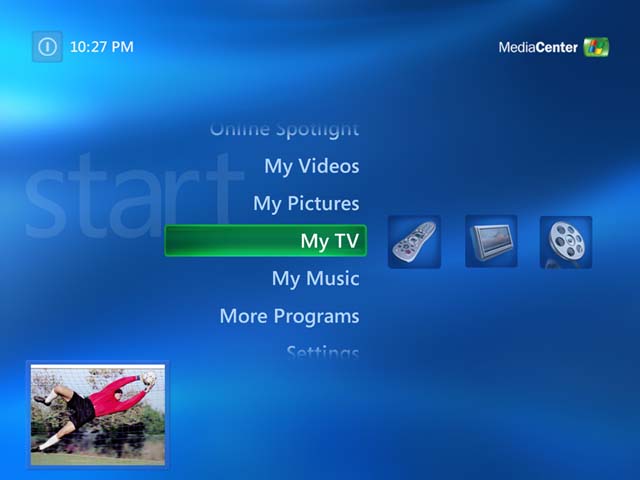


Get on it!
This gives you all Media related options accesible by a remote control... you could have the IR sensor in the car somewhere (Its VERY powerful & sensitive). You have the option within windows to boot straight to media center. You can also setup a decent sleep mode which will allow you to turn it on via the remote control & in theory it is as quick to power up as a TV is... Install a media center compatible Digital TV tuner & you have TV sorted. You can get a dual one that does both analogue & digital too.
Get on it!
Facelift Imola S4 | Cust K04's, Tubular Manifolds, 3" DPs->2.75" Catback | FMIC | PSS9 Coilovers + ARB's | Brembo 8-Pots | SS + DTS | 5??HP/475lbs/ft | 3.06S FATS on S4 Box
Sold: A4 (B5) 2.8 Quattro | Ivory Pearl
Melted: Corrado - IHI 1.8t: 343BHP
Sold: A4 (B5) 2.8 Quattro | Ivory Pearl
Melted: Corrado - IHI 1.8t: 343BHP
Good advice, thanks guys
I think Dave has already considered this, as well as some media "skins".
Just a thought though - can Windows Media Centre be configured to also run non-media programs...such as Vagcom...?
I think Dave has already considered this, as well as some media "skins".
Just a thought though - can Windows Media Centre be configured to also run non-media programs...such as Vagcom...?
Clive
S2 ABY coupe, S4 B5 saloon, S4 B6 avant
RS4 B7 phantom black saloon, mint, fully loaded, low mileage - FOR SALE!- http://www.rs246.com/index.php?name=PNp ... ic&t=88981
S8 D2 facelift, RS6 C5 saloon, both gone but not forgotten
S2 ABY coupe, S4 B5 saloon, S4 B6 avant
RS4 B7 phantom black saloon, mint, fully loaded, low mileage - FOR SALE!- http://www.rs246.com/index.php?name=PNp ... ic&t=88981
S8 D2 facelift, RS6 C5 saloon, both gone but not forgotten
yeah - its just xppro with an additional program whioch is the media center. So you can minimise/close media center and go back to your normal desktop.
Facelift Imola S4 | Cust K04's, Tubular Manifolds, 3" DPs->2.75" Catback | FMIC | PSS9 Coilovers + ARB's | Brembo 8-Pots | SS + DTS | 5??HP/475lbs/ft | 3.06S FATS on S4 Box
Sold: A4 (B5) 2.8 Quattro | Ivory Pearl
Melted: Corrado - IHI 1.8t: 343BHP
Sold: A4 (B5) 2.8 Quattro | Ivory Pearl
Melted: Corrado - IHI 1.8t: 343BHP
-
shineydave
- Cruising
- Posts: 2561
- Joined: Sun Oct 16, 2005 10:22 am
- Location: Bradford, Yorkshire, UK
- Contact:
interesting.......i've never tried Media Centre, sounds like it might be worth a go. the pc itself is too small to accept additional cards but we we're just going to try with some DVB-T dongles and see what the results were. sorry, didn't i mention i'm tighter than a ducks ass, lol
Dave
"if that's the Turbo Fairy knocking tell her i'm not in"
http://www.ukchat.com/home/setnick.asp?room=RS2346
"if that's the Turbo Fairy knocking tell her i'm not in"
http://www.ukchat.com/home/setnick.asp?room=RS2346
i tried the dvb-t dongles out on a laptop on the move and they were ok, i think the standard ariel you get with them was a bit underpowererd, what is the resolution of the nav screen?
it is possible to get programs working within the MCE skin itself, then they would come under More programs, making them load separatly from mce is fine they would just pop up infront of the window, usually what you find is that people write programs to load directly into mce with the same interface, you just download them (like the weather plugin) you set your postcode then i imagine when you start your car up, and MCE is booted the wireless will kick in and download the latest weather report, that would be quite good
whatever you do dont get vista with the new MCE the requirements are far too much and its buggy, get 2005 edition thats the best one to go for.
Media centre uses wmp10 behind the scenes which links directly into windows media player for the playlists so you have control over that there for dvd,mp3,avis etc
Ill have to come and see the thing soon! im not far from yorkshire really
Ol
it is possible to get programs working within the MCE skin itself, then they would come under More programs, making them load separatly from mce is fine they would just pop up infront of the window, usually what you find is that people write programs to load directly into mce with the same interface, you just download them (like the weather plugin) you set your postcode then i imagine when you start your car up, and MCE is booted the wireless will kick in and download the latest weather report, that would be quite good
whatever you do dont get vista with the new MCE the requirements are far too much and its buggy, get 2005 edition thats the best one to go for.
Media centre uses wmp10 behind the scenes which links directly into windows media player for the playlists so you have control over that there for dvd,mp3,avis etc
Ill have to come and see the thing soon! im not far from yorkshire really
Ol
S4 B5 - MRC
Thanks for the input Ol, very helpful. Yes, it would be good to meet up, and also deal with some of the other issues we've been discussing - you'd be welcome any time  we'll have to make some plans
we'll have to make some plans Clive
S2 ABY coupe, S4 B5 saloon, S4 B6 avant
RS4 B7 phantom black saloon, mint, fully loaded, low mileage - FOR SALE!- http://www.rs246.com/index.php?name=PNp ... ic&t=88981
S8 D2 facelift, RS6 C5 saloon, both gone but not forgotten
S2 ABY coupe, S4 B5 saloon, S4 B6 avant
RS4 B7 phantom black saloon, mint, fully loaded, low mileage - FOR SALE!- http://www.rs246.com/index.php?name=PNp ... ic&t=88981
S8 D2 facelift, RS6 C5 saloon, both gone but not forgotten
I used to use an analogue tuner via USB2.0 before I moved to a PCI dual tuner recently. That worked absolutely fine, so no reason why you couldnt get a compatible USB DVT-B tuner.
I use MCE 2005 at home on my PC in the bedroom and this links to my TV/Xbox in the lounge so I can watch recorded tele/pause a la Sky+ through the xbox or while in bed. Its pretty handy - did it more cause I like to muck about with techy stuff.
Getting very interested in your project now... as Olie says - you can write apps to work with MCE so you dont have to go to your MCE desktop... soemthing liek VAG-Com would be too complex, but I am sure there are other things out there that would be useful!
I use MCE 2005 at home on my PC in the bedroom and this links to my TV/Xbox in the lounge so I can watch recorded tele/pause a la Sky+ through the xbox or while in bed. Its pretty handy - did it more cause I like to muck about with techy stuff.
Getting very interested in your project now... as Olie says - you can write apps to work with MCE so you dont have to go to your MCE desktop... soemthing liek VAG-Com would be too complex, but I am sure there are other things out there that would be useful!
Facelift Imola S4 | Cust K04's, Tubular Manifolds, 3" DPs->2.75" Catback | FMIC | PSS9 Coilovers + ARB's | Brembo 8-Pots | SS + DTS | 5??HP/475lbs/ft | 3.06S FATS on S4 Box
Sold: A4 (B5) 2.8 Quattro | Ivory Pearl
Melted: Corrado - IHI 1.8t: 343BHP
Sold: A4 (B5) 2.8 Quattro | Ivory Pearl
Melted: Corrado - IHI 1.8t: 343BHP
-
shineydave
- Cruising
- Posts: 2561
- Joined: Sun Oct 16, 2005 10:22 am
- Location: Bradford, Yorkshire, UK
- Contact:
damn, i'm just going to have to bite the bullet now and invest some of the ShineyDave family fortune on a DVB-T dongle. the card i have in my PC is a dual tuner, analogue and digital, i'd like to see if i could get a similar dongle. i'm wondering if i could tap a signal from the existing TV aerial system to feed the DVB-T as i believe analogue and digital broadcast on similar frequencies. any thoughts?
just mounted the PC properly in the car this evening. well better than the rape tape i was previously using to stop it sliding around. got a piece of inch thick foam rubber from work which i've attached with velcro and then velcro'd the PC to that, it's quite sturdy and offers a level of shock protection.
i think Media Centre is a seperate purchase, isn't it a complete operating system with the media centre interface as an optional component?
i've got the resolution on the PC set to 600x400 at the moment, anything larger means the text is too small to read with my aged eyes.
just mounted the PC properly in the car this evening. well better than the rape tape i was previously using to stop it sliding around. got a piece of inch thick foam rubber from work which i've attached with velcro and then velcro'd the PC to that, it's quite sturdy and offers a level of shock protection.
i think Media Centre is a seperate purchase, isn't it a complete operating system with the media centre interface as an optional component?
i've got the resolution on the PC set to 600x400 at the moment, anything larger means the text is too small to read with my aged eyes.
Dave
"if that's the Turbo Fairy knocking tell her i'm not in"
http://www.ukchat.com/home/setnick.asp?room=RS2346
"if that's the Turbo Fairy knocking tell her i'm not in"
http://www.ukchat.com/home/setnick.asp?room=RS2346
Who is online
Users browsing this forum: No registered users and 111 guests